15 Effective Tools for Visual Knowledge Management

Since I started my quest a few years ago searching for the ultimate knowledge management tool, I’ve discovered a number of interesting applications that help people efficiently organize information. There certainly is no shortage of solutions for this problem domain. Many tools exist that offer the ability to discover, save, organize, search, and retrieve information. However, I’ve noticed a trend in recent years, and some newer applications are focusing more on the visual representation and relationship of knowledge. I believe this is in part due to the wider adoption of mind mapping (and concept mapping), and leveraging concepts and advances in the semantic web community.
Most traditional personal knowledge management (PKM) or personal information management (PIM) applications offer the same basic set of features:
* Storage of notes and documents
* Search functionality and keyword/tagging capability
* Outline view in a traditional hierarchy, or user-defined views
* Task management, calendar, and contact management (mainly PIM, not KM)
These are essential features, however don’t offer too much to the more visually-inclined knowledge junkies. For visual learners and information visualization fans, having a graphical representation of knowledge and seeing how things relate is a must have feature. Luckily, in the past few years there has been a rise in the number of knowledge management applications that offer this capability. The following is a list of interesting /unique / effective tools for knowledge management and information visualization (not listed in any particular order):
15. DeepaMehta
Link: http://www.deepamehta.de/
Platforms: Win, Mac, Linux
Cost: Free (Open Source)
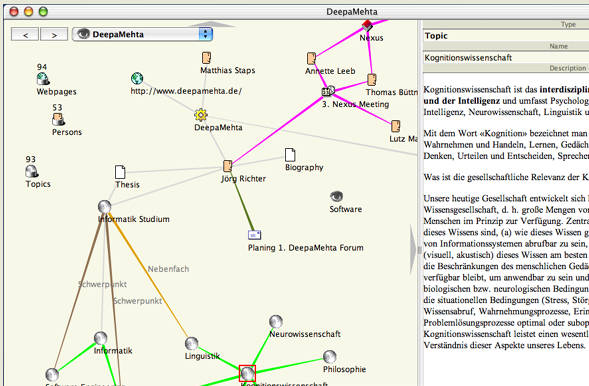
DeepaMehta is a “networked semantic desktop” that replaces the traditional computer desktop. DeepaMehta rids the user from dealing with applications, files and directories. Instead, the DeepaMehta user arranges information of any kind and origin into supportive topic maps. Topics may be e.g. projects, emails, webpages, notes, articles, contacts, or meetings. Users define their own topic types. Old-fashioned applications, windows and files are no longer in the sight of the user, but the meaningful relationships between real world topics.
14. Tinderbox
Link: http://www.eastgate.com/Tinderbox/
Platforms: Mac
Cost: $179
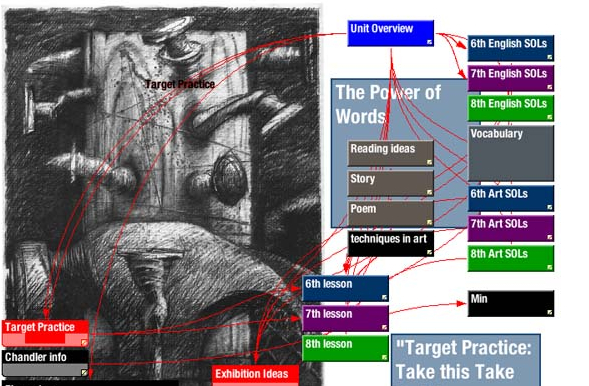
Tinderbox stores and organizes your notes, plans, and ideas. It can help you analyze and understand them. And Tinderbox helps you share ideas through Web journals and web logs. Tinderbox maps your notes as you make them. Build relationships by arranging notes, organizing them with shape and color, linking them. Tinderbox lets you record ideas quickly and keep them where you’ll find them again when you need them.
13. Vue
Link: http://vue.tufts.edu/
Platforms: Win, Mac, Linux
Cost: Free (Open Source)
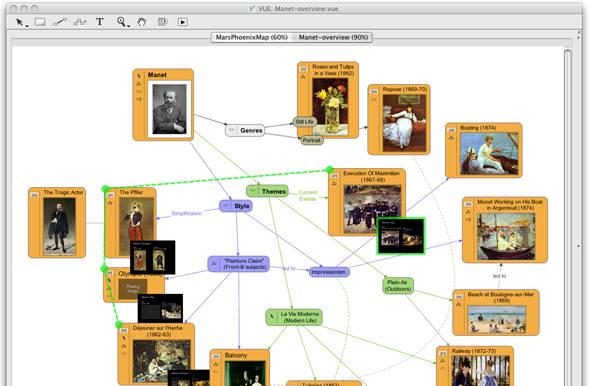
At its core, the Visual Understanding Environment (VUE) is a concept and content mapping application, developed to support teaching, learning and research and for anyone who needs to organize, contextualize, and access digital information. Using a simple set of tools and a basic visual grammar consisting of nodes and links, faculty and students can map relationships between concepts, ideas and digital content.
12. eyePlorer
Link: http://www.eyeplorer.com/eyePlorer/
Platforms: Web
Cost: Free
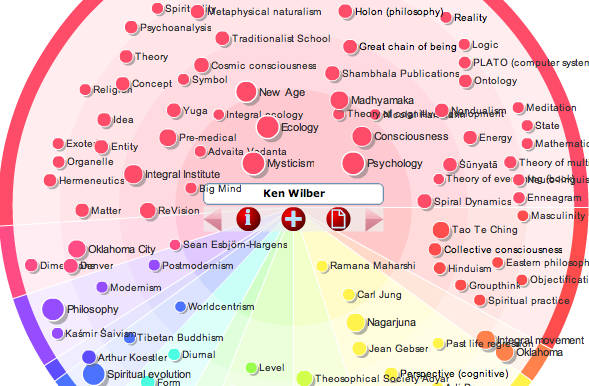
EyePlorer allows you to explore and process knowledge. Search engines help you find links and documents – they require you to follow these links and open the respective document in order to access information. eyePlorer.com, powered by vionto, provides immediate access to facts. It visualizes facts as well as relationships between facts. Furthermore, eyePlorer.com allows you to collect, process and publish interesting bits of information. eyePlorer.com is a visual knowledge workbench.
11. BeeDocs Timeline
Link: http://www.beedocs.com
Platforms: Mac
Cost: $65
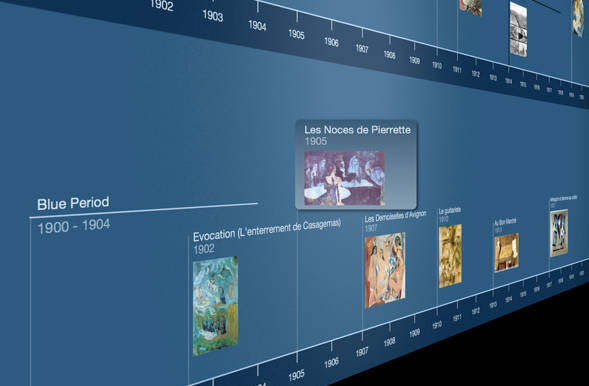
Bee Docs Timeline is software for Mac OS X that makes it easy for you to present historical events in a way that reveals connections and clarifies relationships.
Make timeline charts of world history, family trees, fictional events or business deadlines. Timelines can help you understand and present history with new perspective!
See: https://eric-blue.com/2009/04/14/how-to-create-stunning-3d-timelines/
10. Pathway
Links: http://pathway.screenager.be/features.html
Platforms: Mac
Cost: Free
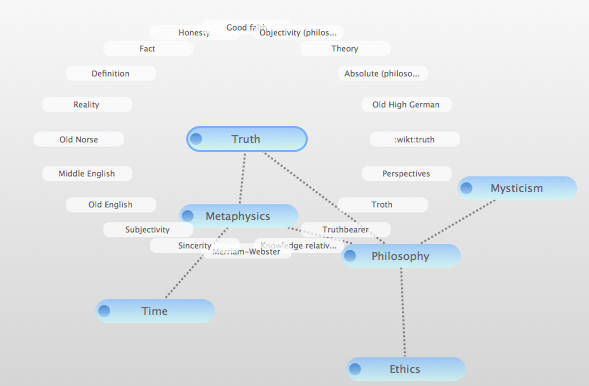
Pathway is a visual Wikipedia browser. It accomplishes this by presenting you with a graphical “network” representation of your visited article pages. A node represents an article, a connection between two nodes means, of course, that you’ve gone from the first article to the second one. You can save the network you’ve created to disk and recover it.
This way, you’re able to keep track of everything: what you’ve looked at, how you got there and just how it all fits together.
9. Axon Idea Processor
Link: http://web.singnet.com.sg/~axon2000/index.htm
Platforms: Win
Cost: Free (Lite version) / $135 (Plus version)
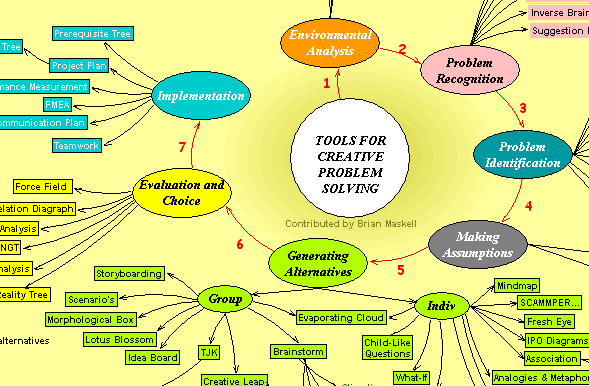
AXON Idea Processor is a Visualization Tool for Thinkers. The Axon Idea Processor provides a flexible and multi-dimensional environment that supports and empowers the thinking processes… Axon does not require you to learn or follow a set procedure, or restrict you to a hierarchical pattern of thoughts. Idea Processing is concerned with problems and solutions, questions and answers, unknowns and facts, unlike word processing which is concerned with formatting. An Idea Processor enables you to work at a higher conceptual level than a word processor.
The Axon Idea Processor provides a flexible environment that supports and empowers the thinking processes. There are tools for organizing and sequencing ideas, tools for outlining and writing, prompting, tabulation, visualization, simulation, etc.
8. Gnizr
Link: http://code.google.com/p/gnizr/
Platforms: Java – Win, Mac, Linux
Cost: Free (Open Source)
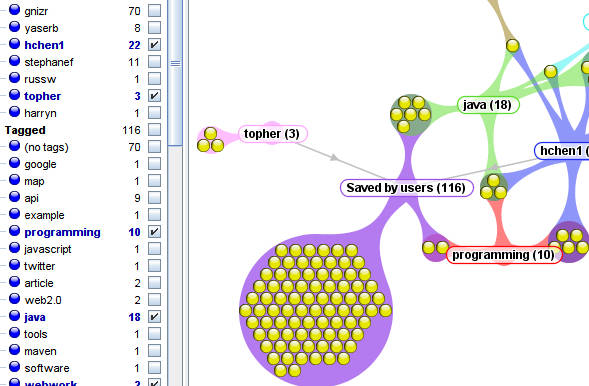
gnizr™ (gə-nīzər) is an open source application for social bookmarking and web mashup. It is easy to use gnizr to create a personalized del.icio.us-like portal for a group of friends and colleagues to store, classify, and share information, and mash-it-up with information about location.
* Archive saved bookmarks and organize bookmarks using tags and folders.
* Edit notes using WYSIWYG bookmark editor.
* Assign geographical location values to bookmarks and view bookmarks on a map.
* Define relationships between bookmark tags — broader, narrower and member-of.
* Tag bookmarks using Machine Tags.
* View bookmarks in Clustermap and Timeline.
* Import new bookmarks from user-defined RSS subscriptions — RSS, Atom and GeoRSS.
* Create new application behaviors using gnizr API. For example:
o Add modules to support custom Machine Tags;
o Add listeners to handle bookmark change events;
o Develop custom RSS crawlers to perform automated bookmark imports; and
o Create third-party mashups from data published by gnizr (RDF, RSS and JSON).
7. CMap Tools
Link: http://cmap.ihmc.us/conceptmap.html
Platforms: Win, Mac, Linux
Cost: Free
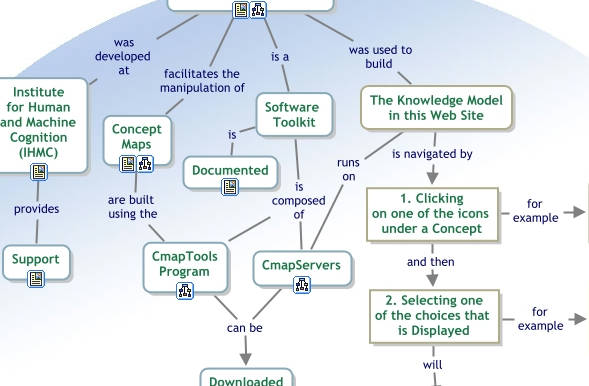
The IHMC CmapTools program empowers users to construct, navigate, share and criticize knowledge models represented as concept maps. It allows users to, among many other features, construct their Cmaps in their personal computer, share them on servers (CmapServers) anywhere on the Internet, link their Cmaps to other Cmaps on servers, automatically create web pages of their concept maps on servers, edit their maps synchronously (at the same time) with other users on the Internet, and search the web for information relevant to a concept map.
6. TreeSheets
Link: http://treesheets.com/
Platforms: Win
Cost: Free
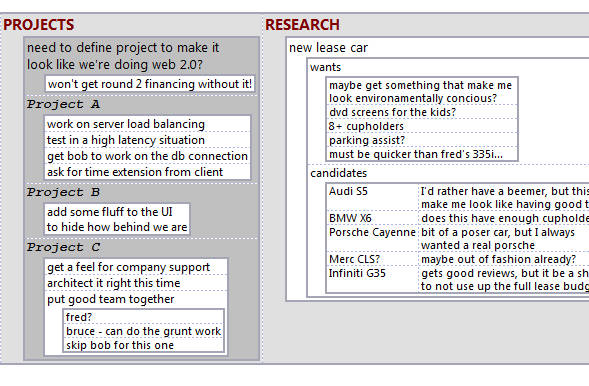
The ultimate replacement for spreadsheets, mind mappers, outliners, PIMs, text editors and small databases.
Suitable for any kind of data organization, such as Todo lists, calendars, project management, brainstorming, organizing ideas, planning, requirements gathering, presentation of information, etc.
It’s like a spreadsheet, immediately familiar, but much more suitable for complex data because it’s hierarchical.
It’s like a mind mapper, but more organized and compact.
It’s like an outliner, but in more than one dimension.
It’s like a text editor, but with structure.
Post continued, click below to navigate to the next page….
5. MindRaider
Link: http://mindraider.sourceforge.net/
Platforms: Java – Win, Mac, Linux
Cost: Free (Open Source)
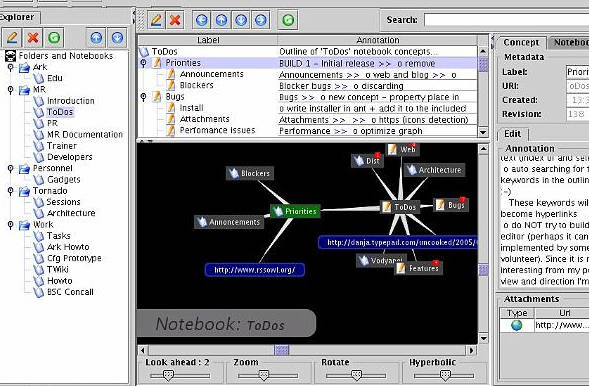
MindRaider is personal notebook and outliner. It aims to connect the tradition of outline editors with emerging technologies. MindRaider mission is to help you in organization of your knowledge and associated web, local and realworld resources in a way that enables quick navigation, concise representation and inferencing.
See: http://mindraider.sourceforge.net/presentations.html
4. Scan
Link: http://scan.sourceforge.net/
Platforms: Java – Win, Mac, Linux
Cost: Free (Open Source)
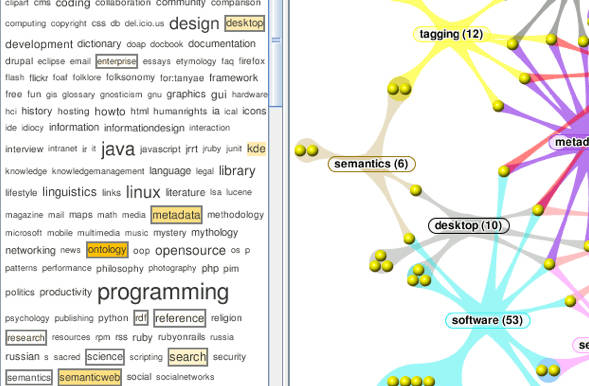
SCAN (Smart Content Aggregation and Navigation) is a personal semantic content manager for desktop users. It combines search, text analysis, tagging and metadata functions to provide new user experience of desktop navigation and personal document management.
SCAN aims at problems of personal content organization and findability in information overload age.
See: https://eric-blue.com/2008/05/18/document-management-systems-scan-smart-content-aggregation-and-navigation/
3. Topicscape
Link: http://www.topicscape.com/
Platforms: Win
Cost: $49.99 (Lite version) / $109.99 (Pro version)
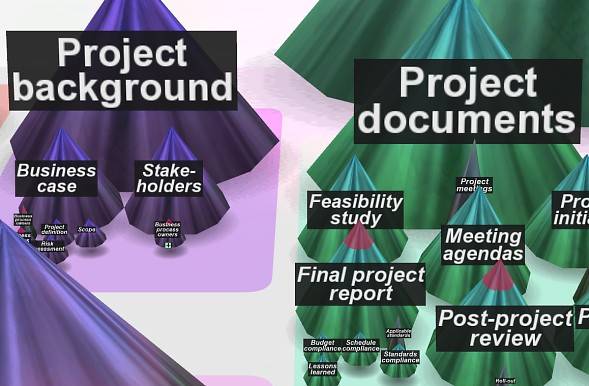
3D Topicscape is personal software designed to help you manage information in a unique way. It grew out of the mindmapping way of thinking but now makes information organizing a 3D activity available to everyone. Even if you’ve never heard of mindmapping you’ll quickly understand what its 3D landscapes are about and see how it helps you save time and find information quickly.
It’s not just about organizing information more efficiently, though. Once you’ve used this, you’ll never want to go back to 2D:
* You will see exciting new relationships between elements of your information that were there, but simply haven’t shown up before;
* you will spot what you’re looking for by recognizing where you are for with the ‘sense of place’ that we all use every day in our 3D world;
* you can identify items more precisely from descriptions that you add yourself to files and topic. Searching can include these descriptions;
* you can go inside the 3D cone of a topic and find the items relating to that topic (occurrences) that you’ve put there;
* you can place the same item in several places, without the need to make copies or shortcuts and therefore find them more easily. How often have you puzzled where to put a document – being torn between two or more places where it seems to fit logically? Here now, is the answer.
2. TheBrain (PersonalBrain)
Link: http://www.thebrain.com/
Platforms: Win, Mac, Linux
Cost: Free, $149.95 (Core), $249.95 (Pro)
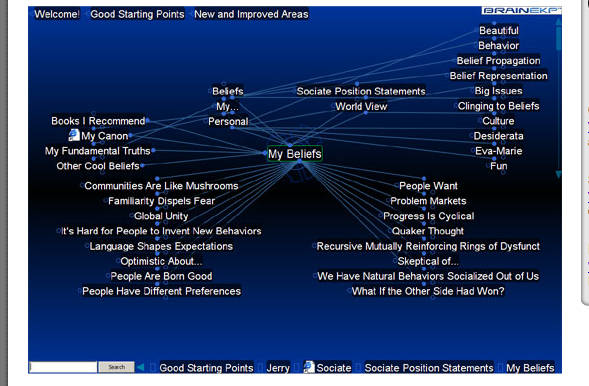
PersonalBrain helps you organize all your Web pages, contacts, documents, emails and files in one place so that you can always find them – just like you think of them. This saves you time and makes your life easier! With PersonalBrain you can even find related items that you worked on, but forgot existed.
* See relationships and connections between key concepts and ideas
* Eliminate digging through files and folders to find what you need
* Link all related information by topic, project, and idea
* Quickly drag and drop files and Web pages into a single unified concept map
1. MindManager
Link: http://www.mindjet.com/
Platforms: Web, Win, Mac
Cost: $10/month/user (MindJet Connect – Web), $349 (MM8 Win), $129 (MM7 Mac)
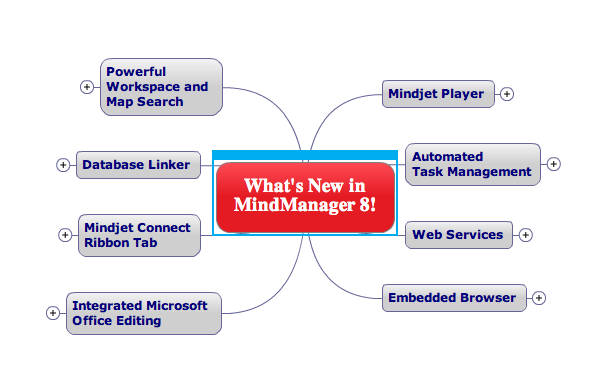
Mind maps created in MindManager are based on the mind mapping method by Tony Buzan. The latest version, MindManager 8, is available for Microsoft Windows only, though previous versions supported Mac OS X and files created in the most recent versions are compatible with both platforms. In 2008 Mindjet introduced Mindjet Connect, an online collaboration service with centralized storage, Instant Meeting, and communications features. Connect is accessible with MindManager 8 on Windows and via MindManager Web, a Flash-based client.
Features include support for manual and automatic task management, filters, an open API, and RSS support. Maps can pull data from Microsoft Excel and Outlook, and can be exported to Word, PowerPoint, Visio and Project, as HTML web pages, as an embeddable Player, and as PDF documents.[1]
Well, there you have it, my collection of unique and effective tools for visual knowledge management! I’ve picked these applications out of a huge list that I’ve researched over the last few years, however it is by no means comprehensive. Please feel free to comment and contribute with other recommended tools.
Related Links
* My Personal Memex – My own personal knowledge management project with a focus on visual presentation (tag clouds, embedded mindmaps, timeline browsing, etc.)
* Mind-Mapping.org – An impressive and comprehensive collection of tools related to mind mapping, concept mapping, and information organization.
Tools Recommended by Readers
Updated: 06/12/09
I’ve covered a lot of ground with the 15 tools listed here, but this is my no means a comprehensive list. Since I wrote the article I’ve had a number of comments and emails giving recommendations for some other interesting tools. I’ve decided to consolidate your feedback and maintain the list of other top tools here (given that they meet the criteria for visual knowledge management tools). Thanks for all of your feedback!
Mind Mapping Tools
* ConceptDraw – Mind Mapping application for Mac
* FreeMind – Open source mind mapping application (Java)
* Mind Mapper – Commercial mind mapping application for windows
* MindMeister.com – Web-based mind mapping application
* XMind – Open source mind mapping application with online sharing (Win, Mac, Linux)
Misc.
* amode (mindsystems) – Flexible visual information manager for Windows
* Ceryl – Intriguing looking knowledge manager (looks similar to MindRaider). Note: no download available yet
* ConnectedText – Personal wiki system with visual navigation for Windows
* Curio – Visual thinking aid: notebook, whiteboard, sketchbook
* Inspiration – Visual thinking and learning tool
* TiddlyTagMindMap – Visual graph (mindmap) navigation on top of TiddlyWiki for personal knowledge management
61 Responses
This is a great article and fascinating blog. I ran into it after searching twitter for #mindmap and #mindmapping. I’m a mac user exploring MindMap and Personal Brain and hoping to glean more from other peoples’ experience. My Twitter name is @gardenwiseguy.
My first love is Mindmapper.com, which I use at work while chained to a PC. I’m a landscape architect and writer. When I come home to the sanity of my Mac environment, I have to compromise the software, hence MindMap by ConceptDraw. Adequate but not as robust as Mindmapper.
Nuff rambling. I’ll bookmark and find my way back.
Hi Billy,
Welcome to my blog, and thanks for your comment! Also, thanks for sharing what applications you use. I’ve never checked out Mindmapper, but it looks interesting. And, I have used ConceptDraw and thought it was a decent product. I’m obviously partial to Mindjet’s MindManager, but it’s good to see other mind mapping products to compare.
Hello Eric,
Nice review, thanks. I’ve tried some of this apps before, but found a couple of new names. Still in search of a ideal KMS…
Hi Andrey,
Thanks for your comment. I’m still building and refining my KMS. Check out my Personal Memex project. The approach I’m taking know is turning the historical, single Knowledge Management System and turning it into a Knowledge Management Stack. The stack includes a number of applications (primarily open source), and a handful of them were featured on this post.
Great list! Just tweeted about it!
Hi Eric
Very interesting post and great compilation of tools! As an educator you may also want to take a look at Inspiration for creating graphic organizers and concept maps.
Brian
http://assistivetek.blogspot.com
Michael,
Thanks for the Re-Tweeting! Twitter’s a great way to spread the word.
Brian,
Thanks for the pointer to Inspiration. I was aware of the name, but haven’t yet checked it out. I plan to do so in the near future.
I guess this may miss two other good tools: FreeMind and XMind. 🙂
Hi Stephen,
Thanks for your comment. I also just replied to your tweet:
@stephenzhu Hi Stephen. I actually like (and use) FreeMind and XMind. In truth,I only had room for 1 mindmap app, and MindJet was my pick.
Believe it or not, I use all 3 tools almost on a daily basis. I use MindManager 8 for corporate use and most of my research and learning projects. I use FreeMind (via my MindMapviewer project: https://eric-blue.com/projects/mindmapviewer/) for embedding mindmaps into my website and wiki. And, I just started trying out XMind on my Mac. In fact, I just recommended it to my development team as a great alternative to FreeMind. The Eclipse plugin is a killer feature!
Eric,
I follow your blog for several month and do know about Memex project. 😉 Actually I have a similar idea for a long time. The truth is that there is not single instrument I can be happy with. At the moment I use Evernote a lot. Wish it also have an alternative visualization support (conceptual map or at least mind map). As for the mind mapping tools I like XMind, but still prefer FreeMind as it has the best support for pasting HTML among all similar tools (and I tried many of them).
Andrey,
Glad to hear you’ve been following. I’ve also experience the “single application unhappiness”. This is what initially drove me to start meshing some open source projects together.
I briefly tried Evernote and I was fairly impressed. I tend to gravitate towards web-based products, but I’m not fond of the concept of other people hosting/owning my data.
Eric,
Evernote saves all information in local database and uses web to backup and synchronize between several clients you may have. Web interface seems to me like an auxiliary way to access your data in case of no desktop or mobile application available. It is hard to say what is more important: to have free reliable backup+synchronization or to keep everything securely. These objectives contradict generally each other and final choice will depend on what data you are going to store there.
[…] כותב בשיטוטים שלי על כלים טכנולוגיים. זהו יוצא מן הכלל. אני מפנה אתכם למאמר שסוקר 15 כלים שונים לויזואליזציה (visualization) של מידע. […]
This is awesome.
It’s always good to have tools listed in one place. I’ve bookmarked this site, and I’m working my way through the (free) applications as rapidly as I can.
Great post! As a consultant, I’ve used MindManager for years in brainstorming, project planning, and all kinds of model development sessions. My clients are always wow’d.
One other tool you may want to add to your list is MindMeister.com. Very similar to MindManager, though not quite as robust. It was one of the first online and shareable mindmapping tools I had come across a year or so ago. It’s really nice to work jointly on a map with geographically dispersed teams in real time or asynchronously.
Thanks—helpful blog, have to follow your links
[…] Eric Blue’s Blog » Blog Archive » 15 Effective Tools for Visual Knowledge Management […]
I too swear by Mindjet Mindmanager, tried Personal Brain but can’t really get the knack of it. Evernote is nice but not really mindmapping app but could be used in conjuction with such an app. I too have heard good things about mindmeister.com and am giving it a go now.
I haven’t found a mind-mapping computer tool that I think is as effective as mind-mapping by hand. Consequently the tool I use most from your list is number 7, Cmaptools.
But some that you include are entirely new to me and look quite intriguing, especially those shown on the first page. Thanks for putting all these apps in one place.
Roger Sperberg
PS: The most fabulous such tool I ever encountered is (was?) Ceryle but roadblocks prevented its moving into open beta or pre-release, not to mention release.
PPS: Thanks to @davegray and @russeltarr, @paulawhite and @mcleod who pointed to this piece on Twitter; that’s how I got here.
KimberlyAnna & Nerd Stalker. Thanks for your comments! Yes, mindmeister is a very good web-based application. There are definitely a good selection of mind mapping products other there (including some others I mentioned in the comments).
Roger, thanks for you comment. I need to give Cmaptools a more in depth trial. I used it for a little bit last year, but not too extensively. It’s one of the best concept map applications I’ve used.
And, thanks for mentioning Ceryle(http://www.altheim.com/ceryle/)! I actually debated on whether or not to include it on the list, and was evening thinking about an honorable mention section. I email the author a couple years ago to get a hold of the beta copy, but never heard back. I really should try to ping again to see if there’s any likelihood of getting the project launched. It’s a very compelling looking project.
This is a very interesting article. Forgive me for being ignorant, but I can only see tools 15-11. I see the comment to click below for more of the article, but I can’t find where to click. Please help.
Hi,
Thanks for your comment and no problem. There might be an issue with your browser, but you should see a box listing additional pages with the links(1-3). You can also access the links directly by going to:
https://eric-blue.com/2009/05/10/15-effective-tools-for-visual-knowledge-management/1/
https://eric-blue.com/2009/05/10/15-effective-tools-for-visual-knowledge-management/2/
https://eric-blue.com/2009/05/10/15-effective-tools-for-visual-knowledge-management/3/
[…] AVI, MOV, WAV for FREE!Educational Videos for Kids about Science, Math, Social Studies and EnglishEric Blue’s Blog » Blog Archive » 15 Effective Tools for Visual Knowledge ManagementPsykopaint – Online photo painting toolFree PowerPoint Templates and Backgrounds […]
[…] Eric Blue’s Blog » Blog Archive » 15 Effective Tools for Visual Knowledge Management […]
Hi Eric!:
Your list is wonderful. I am sure I will be very useful. I have not tested much this kind of application, the only one I know is further CmapTools. I will go to review, gradually, the tools you free us. Thank you very much for your input, as it is now essential to build the knowledge to manage better. Each day we crammed more and more images, text, links, and one that is then lost and confused us into the sea of digital content that we accumulate. What else was using is delicious, which is great.
[…] 15 Effective Tools for Visual Knowledge Management: Eric Blue pulled together a great list of tools for visual knowledge management. When you get to the final page, you’ll see #1: MindManager […]
[…] 15 logiciels de gestion de l’information personnel utilisant des interfaces graphiques : Billet1 (Mind Manager, The Brain, Topicscape, Scan, Mindraider), Billet 2 (Treesheets, Cmap, Gnizr, Axon […]
I think ConnectedText deserved to be in your list. It is mature and has many features you praised in your list.
[…] 15 Effective Tools for Visual Knowledge Management (tags: mind mapping mindmapping) Si vous avez aimé ce billet, diffusez le en utilisant les services suivants : […]
Interesting post. I thought I knew of all the PKMs out there, but you managed to introduce me to a couple. I know you where trying to keep your list to a workable number, but I just want to make sure you are aware of two other interesting, visual PKM tools:
Curio (Mac) http://www.zengobi.com/products/curio/
and
ConnectedText (Windows) http://www.connectedtext.com/
Curio is basically a hierarchy of whiteboards on which you can stick most anything. It has built in mindmapping and outlining tools.
ConnectedText is a personal wiki that has a graphic representation of the connections between notes.
Wow, I’ve also learned something new. I wasn’t aware of Curio or ConnectedText.
ConnectedText looks very intriguing to me. In fact, after looking at the screenshots it reminds me a lot of MindRaider.
Curio also looks very interesting. Great suggestions that i will surely check out!
checkout http://tiddlytagmindmap.tiddlyspot.com. great tool for viualization of a standalone wiki
Another interesting application that was brought to my attention was amode by MindSystems.
http://www.mindsystems.com.au/products/amode/index.php
[…] Announcement of articles And an example of the fourth type is one I want to let you know about: Eric Blue’s recommendations from his analysis of 15 tools for visual knowledge management. […]
[…] Eric Blue’s Blog » Blog Archive » 15 Effective Tools for Visual Knowledge Manageme… – For visual learners and information visualization fans, having a graphical representation of knowledge and seeing how things relate is a must have feature. Luckily, in the past few years there has been a rise in the number of knowledge management applications that offer this capability. The following is a list of interesting /unique / effective tools for knowledge management and information visualization (not listed in any particular order): […]
[…] Eric Blue’s Blog » Blog Archive » 15 Effective Tools for Visual Knowledge Management. Share and […]
Hi Eric. Fantastic site that cites a lot of programs I have used and enjoyed. Tinderbox is an incredible program for the mac that runs on 20 dollar, 300 mHz G3 macs in its earlier versions than the current version. Incredible program for low end to very high end macs. Very cost effective for school systems that have low end macs to teach students concept mapping, mind mapping, storyboarding and maybe even pseudo-topic mapping at a very advantageous price point for the software and hardware combined.
Question: Do you think that DeepMehta could be used for “participatory design” over the web using topic maps and points of view of multiple participants? There is a program from a French technical university – Hypertopic (www.hypertopic.org) – that I was considering tryng to use but DeepMehta might be an alternative if it has a web collaboration capability.
I want to inform you that eyePlorer has now its own blog – the eyeBlog. The blog we’ll keep you up to date with regard to new releases of eyePlorer.com and about new features.
So if you are looking for further information about eyePlorer. Check out the eyeBlog – http://blog.eyeplorer.com/
I keep watching your blog for more interesting posts!
Hi Eric
Thanks for the list I will be sure to try out the suggestions you made, and the suggestions made by others in the comments.
I only came across your blog because I put in a random search for “knowledge visualization tools”. However I will be bookmarking the site for future reference.
Thank You
I think something like Compendium should be on this list.
http://compendium.open.ac.uk/institute/index.htm
[…] 15 Effective Tools for Visual Knowledge Management […]
Amazing how the visual mapping community for qualitative information has exploded in the last year.
I have used Personal Brain for several years now and am very satisfied for it – for a personal application. I love its dynamic interface, which allows representation of complex relationships. However, I am convinced we need tools that can morph in and out of personal and shared spaces at reasonable cost. Personal Brain has a reputedly very expensive enterprise version; there’s a way of sharing personal maps on the web, but not of collaborating.
Compendium and other tools for structuring discussion as well as knowledge management are moving in that direction. Cohere, based at Open University, seems to be an open, web-based version of Compendium: http://openlearn.open.ac.uk/course/view.php?name=Cohere.
[…] Eric Blue’s Blog » Blog Archive » 15 Effective Tools for Visual Knowledge Management Most traditional personal knowledge management (PKM) or personal information management (PIM) applications offer the same basic set of features: * Storage of notes and documents * Search functionality and keyword/tagging capability * Outline view in a traditional hierarchy, or user-defined views * Task management, calendar, and contact management (mainly PIM, not KM) […]
Hi,
Great list. Some old favorites (CMaps and VUE) and a few new ones to check out.
One non-negotiable feature for me when deciding on a new app is the ability to export to a usable format when I am using a visual environment for the beginning phases of a writing project or other “brain dump”. This essentially means OPML export capability so that I can use an app like Omni Outliner to then export to RTF for final creation of a linear word document. (I learned this the hard way after realizing that hours of work were locked into the app I was using (Freemind) and needed to then be manually exported.)
After an extensive review (that I did not turn into a blog post, kudos to you for that) the app I selected for its feature/value (i.e. price) ratio was Mind Node Pro. I encourage anyone on a Mac to check it out. It also has an added promise of a highly anticipated iPhone app that will (I assume) integrate with the desktop version.
On a final note (to current and future developers) one overlooked feature, IMHO is the ability to export these works into fully functional webpages (e.g. collapsible nodes, etc.) They exist in some apps, but usually at the tradeoff of the OPML feature, but more commonly only in a dynamic HTML format (outline only, no visual layout).
Ok, end semi coherent Thanks again for this compilation.
mind42.com is an online free mind map editor/repository that can import/export freemind, mindManager, it’s own format and export image/rtf/pdf…
I’m pretty impressed with it’s javascript application – very smooth. I swap computers from time to time, so for me it’s pretty handy.
[…] softwares are described here: https://eric-blue.com/2009/05/10/15-effective-tools-for-visual-knowledge-management/ […]
http://thisislike.com is another visual knowledge management tool. It allows people to share their associative knowledge and connect related ideas, people, places, and things.
great list of knowledge visualization. i like SCAN, but can you share about it’s implementation example or review? for mind map i like free mind.
great thanks
and a +1 here for mind node too.
even the free version has some really nice features for quickly and easily creating a fairly complex mind map. the gui controls are so simple to use.
definitely worth a look if you’re a mac user
http://www.mindnode.com/
thank you for sharing, the list have enrich me in constructing KMS
wow i guess this tools its nice for users great..good info for although I am still not understand with this device, but this looks amazing
Twitter Comment
15 Effective Tools for Visual Knowledge Management [link to post] via @ericblue
– Posted using Chat Catcher
My favorite tool of this type (which is not in the list) is Personal Brain (now version 5 and version 6 is late in the beta phase and soon to be released.
It’s somewhat similar to DeepaMehta but more robust and more fully developed, includes cloud syncing for mobile users and integration with programs like Gmail, Google Calendar, Outlook and others.
There is a free version which is fully working but does not allow files to be embedded and does not include a calendar (the paid version includes these features).
Here’s the site … http://www.thebrain.com
Consideo: I haven’t used it, it looks complex. It’s a concept mapper with calculations in it for strategic planning and scenario modeling. Maybe useful for general idea bucket, maybe not.
Another knowledge tool that uses a visual paradigm is Assistum. It uses fuzzy logic on the links between concepts. I don’t know how easy it is to “get it”. Some do, some don’t. If you do, it’s very powerful. It’s at http://www.assistum.com
[…] KM tools (Concept map and mind map). A list of tools to visualize knowledge can be obtained at Eric Blue’s Blog 15 Effective Tool to Visualize Knowledge Advertisement LD_AddCustomAttr("AdOpt", "1"); LD_AddCustomAttr("Origin", "other"); […]
[…] 15 Effective Tools for Visual Knowledge Management […]
[…] 15 Effective Tools for Visual Knowledge Management: Eric Blue pulled together a great list of tools for visual knowledge management. When you get to the final page, you’ll see #1: MindManager […]
My wife uses Conceptdraw Mindmap on her mac at home and PC at work.
This is a cool tool that lets you take freeform data -everything from all of your data structure, to tackling problems with a product, to the topics you plan to introduce on lection or presentation – and organize that information to help you brainstorm and better plan for, prepare for, and manage large or small projects.
http://www.conceptdraw.com/samples/resource/images/solutions/mind-maps/MIND-MAPS-Presentation-Exchange-Solar-System-Planets-and-their-Data.png
I prefer TheBrain. The app has evolved a lot since when this article was written. I’ve been using TheBrain since 2002. Over the years I’ve tried many of the solutions listed in this article, however I always found myself gravitate back to TheBrain as my main PKM tool. I summarized my approach to PKM using TheBrain and published it on Udemy. Check it out here: https://udemy.com/course/getting-organized
Hi!
We using Topicscape for many months and we are very suprised! 🙂