Integral Vision Mind Maps
By ericblue Categories: Featured Integral Mind Mapping Personal Development Philosophy Psychology | 16 comments

Overview
Last year I picked up a copy of The Integral Vision by Ken Wilber. I recently decided to re-read the book, and created a comprehensive book summary highlighting the key pieces of information in the book. The book summary is presented in the form of mind maps for each chapter.
Why am I doing this?
I first stumbled upon Integral Philosophy a couple years ago, and quite honestly became hooked. Since that time, I’ve read a wide variety of books and have engaged in the exciting and often daunting task of trying to build a comprehensive and well-informed worldview (or map). There are a number of good intro books that people recommend for first diving into Ken Wilber’s work (e.g. A Brief History of Everything). Regardless of which book you pick, the fact is for most people (myself included) this is a vast and complex topic. Distilling a philosophy/worldview/framework into a small but useful text is difficult to say the least.
I’ve personally found The Integral Vision to be the best intro into Integral. It’s a short, but powerfully-information packed book that definitely does justice to such an interesting and complex topic. My hope is that others who are just getting into Integral Theory/Philosophy will benefit from the mind map summaries. My advice would be to get the book, and use the maps as a study or reference guide to help the information sink in.
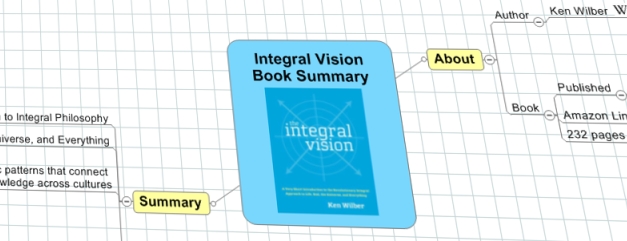
Overview
View Online (Flash) | Download Map (MindManager)
Chapter 1
View Online (Flash) | Download Map (MindManager)
Chapter 2
View Online (Flash) | Download Map (MindManager)
Chapter 3
View Online (Flash) | Download Map (MindManager)
Chapter 4
View Online (Flash) | Download Map (MindManager)
Chapter 5
View Online (Flash) | Download Map (MindManager)
Chapter 6
View Online (Flash) | Download Map (MindManager)
Entire Book Summary
Download (2.0MB Zip)
16 Responses
-
 Luciano Passuello
Wow, Eric — that’s an awesome set of mind maps you have here!
Personally, I have never heard about Integral Philosophy, but judging from the article on Wikipedia and your maps (I looked at all of them), this is deeeeep stuff.
I will keep your maps handy…
…and one more book added to the (bottomless) Amazon Wish List! 😉
Thanks! -
François Jourde
Hello,
This is rather a peripheric question, sorry.
Is it possible to show the notes linked to a mind map’s node, on an online freemind map ?
Thanks,
F. Jourde -
ericblue76
Thanks Luciano! I’ve been meaning to post these for some time, and am hopeful that people will find them useful. I definitely agree that this topic absolutely falls into the ‘deep’ category. Next to technology, philosophy is one of my favorite hobbies 😉
-
ericblue76
Hi François,
If I understand correctly, I believe it is possible to show notes for a given node. If you check out the following url:
https://eric-blue.com/projects/mindmapviewer/
Click on the sample map, and you can see a note embedded in the main node. This was automatically converted from MindManager format, but any freemind map should be able to display the notes in both the Java and Flash viewers. -
Stephen Lark
I can’t get any of the View Online links to work – they all show the following error message:
Flash plugin or Javascript are turned off. Activate both and reload to view the mindmap
I am using Firefox 3.0.5 with Adobe Flash Player 10.0.12.36 on Mac OS X 10.5.6 -
ericblue76
Hi Stephen,
I noticed a similar problem last week while using Firefox 3 with Flash 10 on Linux. Oddly enough, I’m using the exact same configuration as you on my Mac and it looks fine.
Stay tuned while I investigate…. -
ericblue76
OK, problem is fixed. It turns out there was a bug in the original version of the flash loader that was bundled with the FreeMind flash viewer last year. It was missing 2 lines of code in the version checker that was preventing the viewer from loading.
Thanks for bringing this to my attention. -
Eric Blue’s Blog » Blog Archive » FreeMind Flash Viewer Broken With Flash 10? […] to do with my recent upgrade to Firefox version 3. Then today, a viewer commented on a recent post that they were seeing the following error on a […]
-
Stephen Lark
Yep, I just tested all the Flash links and they all work now, cheers mate
-
Jourde
Merci — Thank you for your answer.
It seems to be working !
Best Regards,
François
www.jourde.eu -
Otto
Good god. Well done, god. God is spirit in mind.
-
dezi
I thought I was the only one that creates a study guide as I read a book. It is a lot to take in but it is all very valuable. I reread all of my study guides again and again until they are fully absorbed.
Nice to know I’m not so alone. -
ericblue76
Yes, it can be a very lengthy process. But, I feel it’s well worth it in the end. I probably do this for only 10% of the books I read, but overall I can tell a major difference in comprehension and retention.
-
Adam Sicinski
Great summary Eric.
Personally, if I don’t summarize a book I am reading into a Mind Map, than I have wasted my time reading. Mind Mapping helps organize the thought process and enables the interlinking of different pieces of information that normally would not have been evident before. It also makes for a great reference tool. And this means that we only really have to read through a book once (given that the mind maps are comprehensive in nature).
I hope you can share more of your book summary mind maps in the future. -
Eric Blue’s Blog » Blog Archive » The Value of Theoretical Models & Conceptual Maps […] Vision Mind Maps https://eric-blue.com/2008/12/18/integral-vision-mind-maps/ Spiral Dynamics Mind Map […]
-
Eric Blue’s Blog » Weekly Lifestream for July 18th […] good mindmap summaries of the Integral Vision a while ago but looking for something VERY compact: https://eric-blue.com/?p=614 […]
Comments are closed.