Learning Faster – Automatically Extract Highlighted Text from PDF Documents
Overview
 I never really considered myself a “highlighter” until a couple years ago. Back in school I would, on occasion, highlight some interesting passages while doing homework or reading books and jot them down later. More often then not though many of those highlights would go to waste. After all, what good are highlighting interesting bits of text if you don’t use them later? My highlight compulsion increased about 6 years ago when I dove head first into mindmapping and starting experimenting with a technique called MMOST (Mind Map Organic Study Technique). In a nutshell, MMOST is a strategy for quickly digesting books and summarizing what you’ve learned into a mindmap so you can recall or reference at a later date. For a great intro to the MMOST technique, check out the post on How to Understand a Business Book in Four Hours. What does highlighting have to do with MMOST? While I’m reading a book I’ll highlight the passages that stick out to me and use those as the basis for creating the mindmap summary. It can take a lot of time, but the process of highlighting, reviewing, and creating the mindmap can significantly improve your recall and what you get out of a book (or any research project).
Another big change happened earlier this year when I started using an iPad. I’ve been gradually accumulating more digital books (using PDFs and purchasing books through Amazon using Kindle). After using Kindle for a short time I was blown away by the feature that let’s you highlight book passages and get summaries of the highlighted text and page number (The direct URL is http://kindle.amazon.com/your_highlights. This is REALLY useful for accelerating the summarizing process and the beauty of it is that it’s automatic – the extraction just works! Around the time I started using Kindle for iPad I discovered a fantastic PDF Document reader called GoodReader.
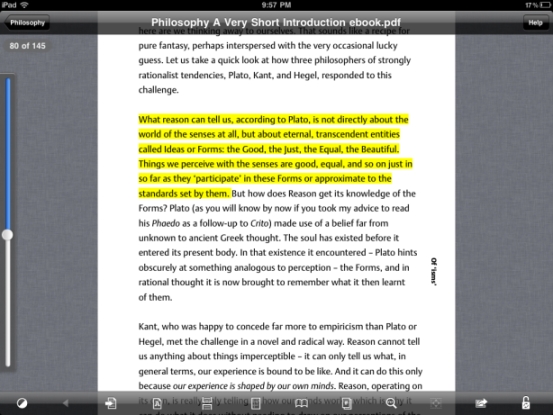
GoodReader is a full-featured document reader with some powerful features. Not only can you take all of your documents on the go, you can access remotely using WebDAV, Google Docs, DropBox, Email, and other online services. Starting a couple months ago it got even better by supporting PDF highlighting and annotations. I thought to myself, “Hey, it would be great if I could somehow extract all my highlighted text just like Kindle. I could TRIPLE the number of books I read and create summaries for almost all of them!”. It turns out this IS possible, but it is no where near as simple as I initially hoped. I dove down the deep rabit hole of reviewing the ~ 1,000 page Adobe PDF specification, hacked and tinkered with Perl and Java code, reviewed numerous open source and commercial offerings, and have emerged (slightly scathed but wiser) with some good solutions.
The Challenge
I won’t get into the nitty-gritty details here, but what would seem a simple operation of extracting highlighted text from a PDF turns out to be exceedingly difficult depending on what strategy you use. In fact, as near as I can tell, there is no existing open source or commercial solution that can reliably extract the 100% text accurately from all documents. The main challenge with PDF is that it isn’t a markup language like HTML that will explicitly tell you how text should be rendered. For example:
This is an <b>example</b> <highlight>sentence that I would like to highlight</highlight>.
The PDF format, while parsable, uses concepts like dictionaries, objects, streams and coordinate systems that tell PDF readers how to correctly render the doc. What this means is that things like annotations (notes) and highlights are rendered separately from the text itself. The best way to visualize this is to think of the highlighted PDF as having 2 distinct layers: the top layer is the highlight itself and the bottom layer is the text. The straightforward strategy is to simply say: “Find the X,Y coordinates of the region of highlight, then find the X,Y coordinates of all text in that same region and simply copy it”. Well, the unfortunate complexity is that in order to find the coordinates of the text you also have to take into consideration the font type and size of the font. After many hours of hacking with only minimal success, I’ve concluded that this method is not currently possible without a lot of additional coding. And, unless somebody can point me in the right direction, I haven’t found any open source or commercial offerings that do this. OK, so you’re probably wondering why I’ve made you read this much of the post only to tell you it’s not technically possible. It is possible, just using a slightly different method.
The Solutions
It turns out that you can automatically extract the highlight with 100% accuracy, but there is a caveat that requires a little more manual work. It sounds much more painful than it really is. The trick is to not only highlight the passage of text, but also copy the text and paste as an annotation (note) on top of the highlight. For GoodReader it’s simply a matter of a couple extra clicks. And for people who use Adobe Acrobat or Acrobat Reader, there is an option in most versions to automatically copy/paste text into a note whenever you select text to highlight (Go to Settings -> Commenting Preferences -> “Copy selected text into Highlight, Cross-Out, and Underline comment pop-ups.”). Here’s how you accomplish using GoodReader as of v3.2.0:
- Select the text you would like to highlight and select Copy. As soon as you click Copy, the menu option above the text will remain.
- Next select the Highlight option. At this point the text will now be highlighted.
- Tap the highlighted text and select the Open option. A note dialogue will appear.
- Hold down for 2 sections on the note until the Paste option appears and select. Click Save.
Basically 6 quick clicks/taps and you’re done. It’s not ideal, but certainly a good trade-off if it means you get to extract automatically and have 100% reliability. Now, there are a couple options for easily extracting your highlights.
Option 1 – Use a PDF Reader to create highlight summaries
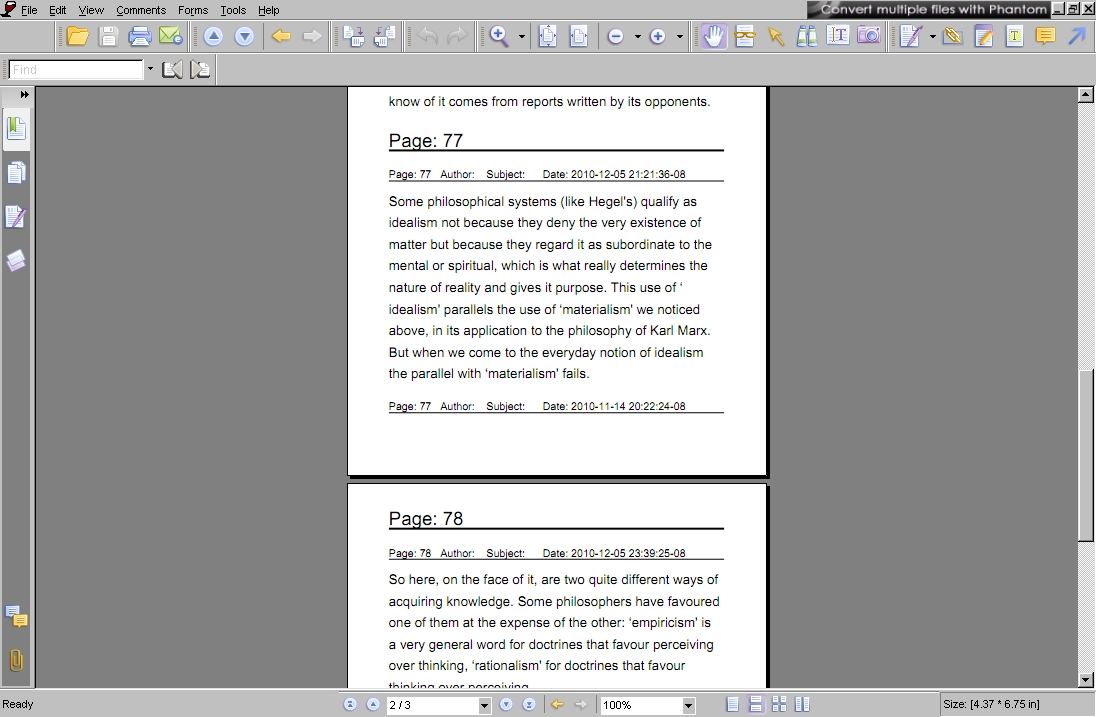
If you have the money, Adobe Acrobat has many features that let you view and print all of your annotations (notes, highlights, etc.). Although not significantly cost prohibitive most people (myself included) don’t really want to spend money if you can find a comparable free or open source solution. Adobe Acrobat Reader (the free version most people use) does allow you to view the highlights in a summary pane, but doesn’t allow you to extract and print (You’ll notice that if you don’t create the annotated note with your highlight the entry will show blank.) The best free PDF viewer that I experimented with is Foxit Reader and it allows you to easily create a PDF summary of your highlights. Simply go to Comments -> Summary Comments and you’ll be prompted to save a new PDF file that only contains the highlighted text along with the page number.
Option 2 – Programmatically extract highlights
For those inclined to hack, there are a couple open source options for parsing PDF files. I first started experimenting with a great Perl module called CAM::PDF. After a few weekends of tinkering around and subsequently needing to dig into the official Adobe PDF specificaiton I realized how complicated PDF parsing, rendering, and text extraction can be. CAM::PDF does make it easy parse the overall structure of the document and extract text for an entire page, but it is very difficult to extract for exact coordinates (for a number of technical reasons). At this point I was still trying to solve the problem with the original strategy of extracing text by x,y coordinates, and after researching for countless hours I realized my open source options were limited. My next step was to experiment with PDFBox, an Apache open source JAVA PDF library. After some searching I was very excited to at least scratch the surface and get preliminary results of text extraction based on the highlight x,y coordinates. I soon discovered that needing to take the font style, orientation, and spacing into consideration to grab the exact text would prove to be time consuming. I haven’t yet found other examples, or reached out on the mailing list, but I’m sure with sufficient determination and time this could be done. Not wanting to devote this amount of time right now to solve this problem, I opted to go for the pragmatic solution of saving the note and extracting that. For those interested, I’ve attached some very simple test code that will extract the annotated comment and I’ve included commented out code for doing very basic (and not yet accurate) extraction based on region/coordinates. When I have more time I may make this a standalone executable so you can run from the command-line and bulk extract highlights from multiple documents:
[codesyntax lang=”java”]
import java.awt.geom.Rectangle2D;
import java.io.File;
import java.util.List;
import org.apache.pdfbox.pdmodel.PDDocument;
import org.apache.pdfbox.pdmodel.PDPage;
import org.apache.pdfbox.pdmodel.common.PDRectangle;
import org.apache.pdfbox.pdmodel.interactive.annotation.PDAnnotation;
import org.apache.pdfbox.util.PDFTextStripperByArea;
public class ExtractHighlights {
public static void main(String args[]) {
try {
PDDocument pddDocument = PDDocument.load(new File(“sample.pdf”));
List allPages = pddDocument.getDocumentCatalog().getAllPages();
for (int i = 0; i < allPages.size(); i++) {
int pageNum = i + 1;
PDPage page = (PDPage) allPages.get(i);
List<PDAnnotation> la = page.getAnnotations();
if (la.size() < 1) {
continue;
}
System.out.println(“Total annotations = ” + la.size());
System.out.println(“\nProcess Page ” + pageNum + “…”);
// Just get the first annotation for testing
PDAnnotation pdfAnnot = la.get(0);
System.out.println(“Annot type = ” + pdfAnnot.getSubtype());
System.out.println(“Modified date = ” + pdfAnnot.getModifiedDate());
System.out.println(“Rectangle = ” + pdfAnnot.getRectangle());
// Sample code taken from Canoo unit test – extractAnnotations
// See https://svn.canoo.com/trunk/webtest/src/main/java/com/canoo/webtest/plugins/pdftest/htmlunit/pdfbox/PdfBoxPDFPage.java
// Experimental – Not completely working since rectangle doesn’t take font size/spacing into account
// PDFTextStripperByArea stripper = new PDFTextStripperByArea();
// stripper.setSortByPosition(true);
//
// PDRectangle rect = pdfAnnot.getRectangle();
// float x = rect.getLowerLeftX() – 1;
// float y = rect.getUpperRightY() – 1;
// float width = rect.getWidth() + 2;
// float height = rect.getHeight() + rect.getHeight() / 4;
// int rotation = page.findRotation();
// if (rotation == 0) {
// PDRectangle pageSize = page.findMediaBox();
// y = pageSize.getHeight() – y;
//}
//
// Rectangle2D.Float awtRect = new Rectangle2D.Float(x, y, width, height);
// stripper.addRegion(Integer.toString(0), awtRect);
// stripper.extractRegions(page);
//
// System.out.println(“Getting text from region = ” + awtRect + “\n”);
// System.out.println(stripper.getTextForRegion(Integer.toString(0)));
System.out.println(“Getting text from comment = ” + pdfAnnot.getContents());
}
pddDocument.close();
} catch (Exception ex) {
ex.printStackTrace();
}
}
}
[/codesyntax]
Of all the APIs I reviewed PDFBox appears to be one of the best: enumerating through the annotations is easy, extracting the note is just as simple, and the basic API is there to extract highlights with no need for the note (just be prepared to dig in and do some work). I also spent some time researching Adobe’s Javascript API and saw some forum posts where a person had mentioned they wrote a JavaScript plugin for Adobe Acrobat Reader that extracted the highlight without the need for the notes. However, I could not find a working example. With further research I’m sure this could be another option.
For the short-term, my practical solution is going to use Foxit Reader to create the highlight summaries. Foxit works under Wine (linux) and I’ve been able to share my GoodReader docs over WiFi and mount that Goodreader share as a WebDav folder. This means that once I’m done reading and highlighting a PDF I can easily open up in FoxitReader without needing to copy anything, generate the highlight summary, and save back to my Documents folder. Longer-term I’ll probably elaborate on the PDFBox code and write a program to automatically extract the highlights and save as text, XML, or HTML.
Other Links of Interest
- My PDF Bookmarks from Del.icio.us (TONS of good links found during research)
- Python – Scrape Highlighted (Not portable, but uses a combo of Python, AppleScript and SkimPDF for Mac)
- Python – PDF Miner
- PDF Can Opener (Inspects PDF docs)
- Acrobat Exhibit Highlighter (Some highlight tools using Javascript to enhance Acrobat)
- Topic Grazer (Windows – helps with text extraction)
Happy Highlighting!
41 Responses
Very helpful–thanks for summarizing what it took so much time to figure out.
Hi,
Thank you for a very helpful article. Being able to easily extract highlighted text from a pdf in the form of a summary would be a huge time-saver.
I don’t understand what you write about FoxIt though. Your image clearly shows the full text, while when I do “summarize comments” the summary only shows (in addition to my actual comments) something like “Page: 13 Author: koen Subject: Highlight Date: 2011-01-01 15:23:13-05” rather than the actual text that is highlighted.
So it’s possible that I did something wrong in FoxIt and am not seeing the feature you use, or that I misunderstood you and that you simply mean that the result you got is the result one gets when one does the more labor-intensive method you describe above (basically copy-pasting the highlighted text into comments and then summarizing the comments) rather than than Foxit automatically can extract the highlighted text and so create a summary.
Any help on this would be greatly appreciated.
Koen
hi, thank you for your great article
Here is what I found, it seems easier this way :
1-
You’ll need PDF Xchange Viewer (basically under windows but it runs well under linux using wine emulator). The limited free version is far enough and you don’t need the pro version for what we want to do
2-
Configure your reader like this :
Edit > Preferences > Commenting > check ‘Copy selected text into Highlight, Cross-out, and Underline comment pop-ups’ > Apply
3-
Highlight your text as usual while reading your pdf
At the end of your reading :
> Comment > Summarize comments > in section ‘Output’ under ‘Type’ select ‘Plain text (*.txt)’ > Choose a file name
You now have a file with all highlighted text. With plain text format we can easily get rid of pages numbers, dates and authors if needed with a little script
Hope it could help somebody and sorry for bad english
Thanks for that Sacco!
the good (dare I say “great”!) thing is that it works, the somewhat bad thing is that it seems to require the Pro version although it does work in the Free version but it gives a message that you need the Pro version and that if you don’t do the upgrade and continue with just the free version something will be done to your doc (like a watermark or something).
This sounds a lot sketchier than it seems to be in reality, but I can’t get the program to give me that message again so I can’t check what it said exactly, and I can’t really tell whether anything happened to my doc.
also, be sure to de-select “Place each group on separate page”
Oh, I think I figured it out. The only downside of the free version vs. the pro version (which btw is quite cheap at 25 Euro) is, I think, that the free version puts a watermark in the summary with the highlighted text. That’s not too shabby!
FYI – The iPad app iAnnotatePDF has a setting called “Auto-Add Markup to Annotations” which copies each highlight into a note for you, eliminating the need for all those extra clicks you mentioned as necessary for GoodReader.
There is an Acrobat Pro plug-in called AutoBookmark from EverMap which converts all highlighted text to bookmarks, and there are several options available for extracting bookmarks. I haven’t tested these yet, though.
Many thanks for the advice.
HERE IS THE BEST SOLUTION:
http://skim-app.sourceforge.net
SKIM is an open source application for Mac OS X.
It allows you to:
1. Add highlights and comments your PDF files.
2. Convert existing highlights and comments created by other apps including Acrobat and GoodReader to a form readable by Skim.
3. Export all of your highlights and comments into a text or rtf file. THIS IS GREAT!!!!
SKIM IS FREE.
Download it.
This is a great article which I came across -again-, so this time I’d like to add to those (aptly 🙂 praising PDFX-Change. For Windows (and Linux with Wine) users, it can do exactly what Skim does for Mac users in the free version, too; and not changing the document properties. In addition to .txt export, you can also choose to export to .rtf and/or .html (with options to select which data to export). The watermark is intended for the exports of annotations/highlights to .pdf format – which is another option. The .RTF export works very nice, and the HTML exports provides a table-like view of all annotations&highlighted text(provided you chose to do so in the preferences, as per sacco’s comment above). So try it with all these options in a test document and you’ll be happily surprised:)
It works but only if you have done the highlighting in PDF-XChange. Still it is quite inconvenient that pages numbers, dates and authors are in the file.
The problem is that my main pdf program is Foxit PhantomPDF and the PDF-XChange can’t extract highlighted text created in Foxit.
Text highlighting is such an important feature and there is not a single company able to have a good solution for that. Most have none. So lame! … and the Adobe is the worst of them all – their highlighting is the most primitive one (and the most expensive) requiring many mouse clicks just to switch between colors.
Thanks for this great article! I cannot understand, however, how you managed to do this with Foxit. Your image file attests that it is possible, but when I follow the directions you gave, I (like Koen above) only get the page number and date highlighted, the actual highlighted content is not exported. Please do explain. This would be a big help for me as I prepare for my exams. Thanks!
Thank you, sacco!!
This was excellent help.
I was not able to do this with FoxitReader. Instead I ran into the same trouble Koen described about a year ago.
I still do not understand, why the author of this article would not reply to the posts. It seems to offer such valuable advice, but really is worthless without great comments (->sacco).
Thanks again!
You know… I was also looking for a way to export my highlighted text from pdf books to a new document but ..
It seems there is no way to do it. I mean I cant find it.
So then my conclusion is .. that all those fancy Pdf software like acrobat is useless.
I say again.. All those software is useless.
What goal have those programs if you cant even summarize and export your highlighted text?
Well nothing….
Thanks for the topic.
That really WAS useful.
I’ve had a couple comments from people mentioning they couldn’t get this to work with Foxit. I haven’t checked out newer versions, but it definitely works on the version I have installed (from 2010) 4.3.0.1110.
Also, GoodReader has been enhanced so you no longer need to highlight + copy/paste text. Simply highlight and you can click a button to get a new summarized PDF with just the highlights.
Hello,
I noticed Docear is making good progress on extracting highlighted text from pdf. Anyways, they seem to have some dificulties but working hard to overcome it.
more here: http://www.docear.org/software/details/
cheers
Eric the problem is that the Summarize option only works for COMMENTS, not for HIGHLIGHTED TEXT, which is what most people are aiming for, pretty much the thing you are talking about that GoodReader just updated.
For someone who highlighted a whole book in Foxit, they should Copy paste that text into the highlight comment section, which is a tremendous effort for what should be a very basic feature. Only if you add a copy of the highlighted text to the comments will you get the summary of it.
@Facundo
I used to highlight text using Repligo reader on my android tablet. I used Foxit (v 5.1 on my Windows machine) ‘s summarize comments feature. It extracted all the highlighted text (not just comments) properly!
very helpful — thank you for this. any more good articles on summarizing pdf or book highlights!?
Really need this too to work on FOXIT – Printing Highlights with TEXT.
you showed a screen shot with of the “summary comments”. I downloaded it, and it only gives me page# and the “subject” of what I did. But it wont print the actual text summary of what i highlighted? Please help…I really want to do this.
Thank you.
You should check out the free PDF-XChange Viewer: http://www.tracker-software.com/product/pdf-xchange-viewer
I also has an option in the preferences to automatically copy highlighted, cross-out and underline text to a comment that can then be summarized in a neatly presentable way.
Check it out I think it’s good!
[…] It turns out that extracting random bits of text from PDF files (like page numbers in the header) is surprisingly difficult, but this solves the problem at least […]
Thanks for putting this together Eric.
James is right. Install Skim, it does the trick. Once in Skim go to Edit -> Convert Notes and you’ll get all that in the side then go to File -> Export Notes as RTF.
Works a treat. This is going to save me a bunch of time.
Also I’m picky and didn’t like the page numbers being in there. You can paste into Excel and then run the following macro to remove the lines. The result is pure, unadulterated knowledge — what you wanted in the first place.
Sub DeleteRows()
Dim c As Range
Dim SrchRng
Set SrchRng = ActiveSheet.Range(“A1”, ActiveSheet.Range(“A65536”).End(xlUp))
Do
Set c = SrchRng.Find(“•”, LookIn:=xlValues)
If Not c Is Nothing Then c.EntireRow.Delete
Loop While Not c Is Nothing
End Sub
Hi this is Chaitanya,
The above topic is very helpful, but i have got one problem while reading two coloumns Highlighted data in one pdf page. if any one have solution please share with me.
Thanks in advance.
Or, you know, you could just use e-mail annotations summary from GoodReader, which, by far and large, does a fairly decent job of including ALL types of annotations (a lot of which most viewers and annotation extractors seem to have major problems with) and forget about the whole fuss. Nonetheless, out of curiosity or otherwise I too decided to plunge into the mess that is PDF processing only to come as far as just about everyone else has… Yes, bulk processing may have it’s merits, but so far it is just not worth it.
On a related note, PDF should JUST DIE! It is a mystery to me how it continues to exist given the mess that it has already caused… How many more exploits do we need for it to continue to exist, despite it being massively outdated, a burden to work with, and a nuisance in just about any aspect. It is a legacy format that should have been long forgotten by now. There are a gazillion of tools and libraries built around it to try to cope with its massive shortcomings and yet no two of them can claim any level of reliable interoperability beyond the common denominator of the most basic features (which I guess is all that is needed in 99% of the time, but then why do we need such a mess of a format if it is only 10% of it that is really needed in 90% of the use cases?). Eitherway, I don’t suppose it is gonna die any time soon, just like Flash, even though it should have long time ago, and it will continue to annoy people and waste people’s time for many more years to come. Hooray! :/
On Mac OS X, PDFoo is a new app that provides the ability to link into PDF documents, into any item of the table of contents, to a specific page, or any text on any page. It also has the ability to extract text/highlight annotations to a rich text file with a URL link back to the location in the original PDF. Follow the pdfoo:// link and you can quickly lookup the context for each annotation. PDFoo is available on the Mac App Store, and lives at http://www.onekerato.com
Thanks.
[…] Eric Blue’s Blog » Learning Faster – Automatically Extract Highlighted Text from P… If you have the money, Adobe Acrobat has many features that let you view and print all of your annotations (notes, highlights, etc.). Although not significantly cost prohibitive most people (myself included) don’t really want to spend money if you can find a comparable free or open source solution. Adobe Acrobat Reader (the free version most people use) does allow you to view the highlights in a summary pane, but doesn’t allow you to extract and print (You’ll notice that if you don’t create the annotated note with your highlight the entry will show blank.) The best free PDF viewer that I experimented with is Foxit Reader and it allows you to easily create a PDF summary of your highlights. Simply go to Comments -> Summary Comments and you’ll be prompted to save a new PDF file that only contains the highlighted text along with the page number. Share:ShareLike this:LikeBe the first to like this. from → Uncategorized ← Bibliographic Maneuvers in the Dark No comments yet […]
Hi there,
it’s a bit out of subject but still in the same thematic :
for those who are interested, I wrote a script for jailbroken iPad/iPhone that allows to save whatever you select (there is no highlighting, you select a word, a sentence or a paragraph and it is added to kind of clipboard but not highlighted in the document) in any type of document you are reading (html, ebook, pdf…), whatever is the app you are using to view it (goodreader, iannotate, icabmobile, safari…). At the end of your reading, you can paste the result in your favorite text editor (pages, note…) and save your work. Quite helpfull when you want to keep something from each article you are reading in different apps.
If someone need such a script, just ask, I will post it there. Be aware that you need a jailbroken iPad and that you will need to install a php server (Lighttpd) and iFile, both from cydia (please dont ask me how !), to make the script work : it’s written in php and bash (I dont have apple license 😉 ) and use pbcopy an pbpaste system command line in background
cordially,
Hi ,
I have a requirement wherein I need to extract text from a pdf file.
The thing is that I need to capture text only in red colored boxes in source PDF.
Does anybody know any tool available.
Writing such a program is really simple, all we need to do is to scan from beginning of PDF from left till a red pixel is identified .
Once that is done copy paste all characters till next red pixel is available.
I quit programming 10 yrs back
I´ve done it with pdf-xchange-viewer but to
– Edicion (“Edit”, I suppose: I used spanish version)
– Opciones del programa (Ctrl+K, “preferences”, “option” or similar)
– In category Comentarios (“commenting”?), check “Copy selected text in highlighted comentaries…” (or something like that…)
Tx Eric, salud
Alberto
I´ve done it with pdf-xchange-viewer but to get it you have to do this:
– Edicion (“Edit”, I suppose: I used spanish version)
– Opciones del programa (Ctrl+K, “preferences”, “option” or similar)
– In category Comentarios (“commenting”?), check “Copy selected text in highlighted comentaries…” (or something like that…)
Tx Eric, salud
Alberto
Thanks very much, helpful summary of information which seems to difficult to find elsewhere!
I have been reading this topic with some interest.
Adobe Acrobat version 5 did everything that you are describing here to do in multiple steps. After version 6 they did away with the simplicity and introduced the new enhanced acrobat that now takes this number of steps to accomplish something that should be simple. Here is how it worked in version 5.
1) highlight your chosen text throughout the document.
2) Went to Tools>Comments>Summarize…
Poof!! it created a pdf with just the highlights. Not a highlight per page as it does in the new versions, but a true summary of highlights with the Page No of where each was in the document.
It worked the same way not only for highlights but any other comment type in the document that one chose to summarize individually or in conjunction with others. Why they chose to replace that simple model with what is now in existence is beyond me. My opinion, whomever made that decision at Adobe needs to find a different profession other than designing software.
on Windows XP
–tested Docear
–tested PDFXchange-viewer (only the reader, free version) as mentioned above
–found both useful in this way:
1)highlighted text in PDFXchange-viewer ONLY may be imported into Docear (drag and drop in new mindmap, topic or subtopic; make sure to have on options the “import bookmarks” disabled); subject of highlights is imported in a organised tree manner.
2)export mindmap in txt, HTML or doc – only the name of the source pdf file in displayed, text is clean of author’s name or date
3)PDFXchange-viewer has a VERY GOOD search feature (e.g. searches within multiple pdf files in a folder)without indexing folder first
4)both are portable
Thanks Eric for your great post.
I got everything working. Yes!
For me, using “Documents by Readdle” seems to work best for iPad.
It’s free and works neatly.
In the app, I would copy txt > highlight > add note > send by E-mail > then I use windows “Foxit Reader” to summarize the comments.
Foxit works just fine. The menus have changed though. 😉
Worked for hours to figure this out and your post helped greatly!
Thaks…
found this:
http://franciscomorales.org/2012/10/18/how-to-extract-highlighted-text-from-a-pdf-file/
Tested with PDFXchange-viewer (only the reader, free version)and works, but not very well; maybe I’m doing something wrong.
using the tips from the site I previously mentioned, i only changed the script with this one, in PDFXchange viewer free version; it attaches a file containing only the comments to the pdf; myCommentList may be .doc, .txt, .rtf .
comments are arranged in page order, in UTF-8
var annots = this.getAnnots();
var cMyC = “Comment”;
for ( var i=0; i<annots.length; i++ )
cMyC += ( "\•" + annots[i].contents+"\"");
this.createDataObject({cName: "myCommentList.doc", cValue: cMyC});
this.exportDataObject({cName: "myCommentList.doc", nLaunch: 0});
I am no scripter/developer, yet this function should have a dedicated button in any pdf reader.
Hi, Eric
This post is indeed very detailed and helpful to those who are looking to extract highlighted text from PDF documents. It can be similar to making notes and highlights on Kindle and being able to access them online, which can be hard for some users.
There is an iOS app that will be released on November 2013 called Snippefy (www.snippefy.com). It will allow Kindle users to read and share their notes and highlights to various social media and export them to Evernote, Dropbox and email as well.
I wanted to share this with you and your readers as I find it to be quite helpful and I hope you will too.
Thank you
Nathan
Try this site- http://www.sumnotes.net
A few bugs but I managed to copy all my Adobe Reader highlighted sections into a text document. Finally!
Natalie – thanks a bunch for suggesting Sumnotes! Just what I have been looking for.
Re Sumnotes – it’s not ready for prime time! Natalie above hints, “A few bugs . . .” It’s more than that. I bought the $14 full version of this program and it not only failed to pick up obvious highlights but for those highlights that it did recognize, it failed to list them sequentially. So, for example, a highlighted line from Page 1 might not appear until the end of a summary on Page 2. This program ended up being a time waster, not saver. What’s more, there is no support link provided on the Sumnotes website. However, I managed to track down a contact telephone number and whoever answered the phone was more concerned about how I managed to get his telephone number than with helping me resolve the issue. He said that I should have responded via the website’s support email link. Yet, when I pointed out that there is no support contact email available from the Sumnotes website, he said that that was a “good catch”. So for anyone else reading this cautionary tail, the bottom line: Proceed at your own risk. I submitted a PayPal claim for the 14$.
First of all, great post and great comments 🙂
After reading, I desist of coding a solution: I thought the “coordinates or marks” should not be rocket science but I believe you!
About the comment above saying Adobe Acrobat 5 easily exporting the highlights, unfortunately was not true for me. I took the time to install Acrobat 5.0.5 into Windows XP Virtual Machine and as many people report: It generates the PDF summary with anything else but the text highlighted.
The best solution so far I found for Android, was to use ezPDF reader to read & highlight the PDF file. The app has the feature to export the highlights to several formats:
– XFDF: which sometimes doesnt work, creates a 0 bytes file
– FDF: always works, but I do not find it useful … despite several PDF Windows programs “interpret” it correctly, all those apps cannot export the highlighted text to excel, word or txt …
(Windows apps I am talking about: Acrobat DC 2015, Foxit Business 7.2, PDFXchange Pro 5.5, Infix 6.3.3, Revu 12.5) and inspecting the file content dont give much clues about the format of it.
Yeah, some of them have the “summary” feature but does not include the highlighted text unless you make the setup tricks for PDFXchange or Foxit or Revu and highlight your PDF within the app (which has been widely discussed in the comments): “Solution” which is NOT useful to me as I want to read&highlight in my Android tablet …
– TXT: This is which brings some light, because it contains the highlighted text (finally, good news!) but also includes metadata (autor, date, page) which is not impossible to delete to leave the meat alone.
But then there is a bug: In case of highlights which single occurence consist of multiple lines, ezpdf does not add a space to the word at the end of the line which sticks it to the first word of the next line. Yeah … sounds simple to run the spelling checker and let the magic happen … but consider: time to purge the metadata from the txt + time to run the spelling checker (being validated by a human to make sure the correction adds a space between words instead of replacing words)
Total Time invested: Too much!
I already built a VBA script to export the txt data file to an excel in columns but I feel defeated about how to solve the spaces between words: which happen as many lines are highlighted in a book (a lot!) … mmm to make the computing world happy maybe I should highlight single lines .. LOL!
So … if you have any better suggestion (without so much human intervention) is more than welcome …